CRM automation for small business means letting your customer system send the routine replies, reminders and follow-ups for you. Picture this: a lead fills out your website form late on a busy Friday. By Monday, nobody has called back, and that lead has already hired someone else. This guide shows what a CRM does, which tasks to automate first and how to keep a person in charge of the parts that matter.
Key takeaways
A CRM keeps every contact, conversation and open deal in one shared record.
Automation handles repeat steps, such as instant form replies and appointment reminders.
Start with one or two workflows, then add more once those run smoothly.
The SBA advises having a person review the messages that AI tools create.
What a CRM Does for a Small Business
CRM stands for customer relationship management. At its core, a CRM is a shared record of everyone you do business with. Each contact gets a profile with their details and your history together. For example, you can see the last call, the estimate you sent and the note a coworker added last week.
Most systems handle a few core jobs:
Storing names, phone numbers, emails and addresses
Logging calls, emails, texts and meetings
Tracking deals, estimates and open jobs
Assigning tasks and reminders to team members
Sending emails and texts from one place
As a result, anyone on your team can pick up a conversation without asking who spoke to the customer last. Once that record is in place, automation can start doing the repeat work.
Signs You Are Ready for CRM Automation
You may not need software on day one. Still, a few signs suggest your current system is costing you work:
You search several inboxes to find one customer’s history.
Leads wait a day or more before anyone calls them back.
Only one person knows where each job stands.
You retype the same emails and reminders every week.
Customer details live on sticky notes, in phones and in spreadsheets.
If two or more of these sound familiar, CRM automation will likely save your small business real time each week.
If your customer details live on notes like these, a shared CRM record is the first fix.
CRM Automation for Small Business: What to Automate First
Automation lets the system handle routine steps for you. You set the rules once, and the CRM follows them every time. Here are common starting points, with the event that sets each one off:
What starts it
What the CRM does
Form reply
Someone fills out your website form
Sends a quick reply and creates a call task
Missed call text back
You miss a call during a job
Texts the caller so they know you will call
Appointment reminder
A visit is booked for tomorrow
Sends a reminder with the time and address
Estimate follow-up
An estimate sits unanswered for a few days
Reminds you, or the customer, to check in
Review request
A job is marked complete
Asks the customer for honest feedback
Pick the one or two that would save you the most time this month. Then add more once those run smoothly. In addition, route new leads to the right person on your team, so nobody assumes someone else has it.
Tip: Write every automated message the way you would say it in person. Short, friendly texts with your name in them feel far warmer than stiff templates.
Build a Pipeline That Matches How You Sell
A pipeline shows where every deal stands. You set up stages that match your own process. For instance, a contractor might use “new lead,” “site visit,” “estimate sent,” “won” and “lost.”
Seeing deals in columns makes problems easy to spot. If many estimates stall at the same stage, you know where to focus. A pipeline also helps you plan staffing and cash flow, because you can see the work that is likely coming. This is also where CRM automation helps a small business most. Each stage can trigger its own step, such as a follow-up task when a deal moves to “estimate sent.”
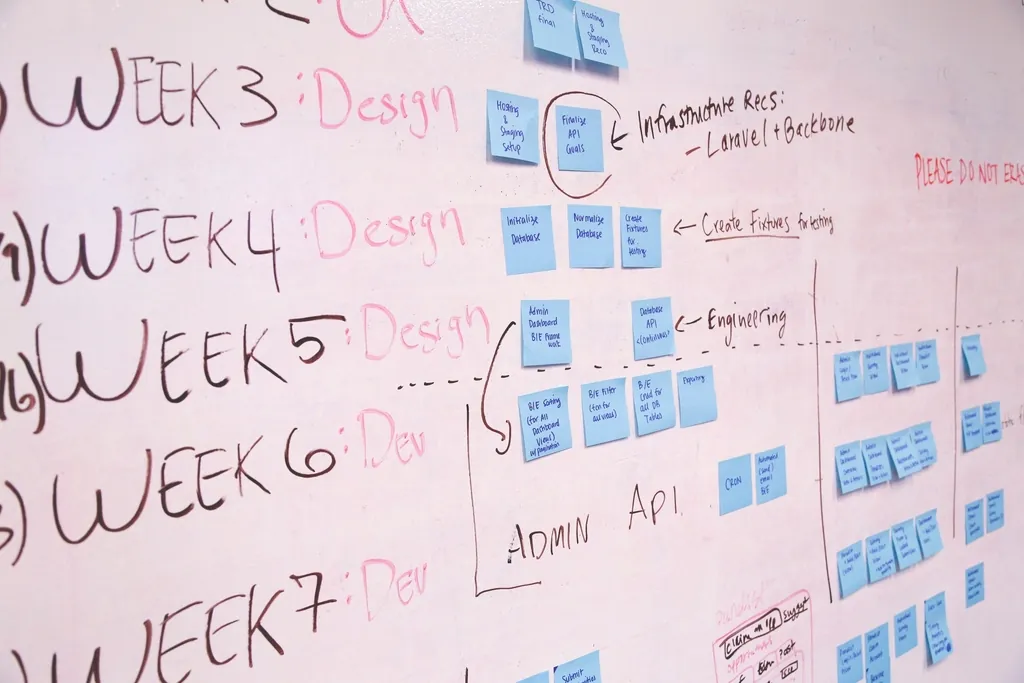
A pipeline works like a board of columns, so you can see at a glance where each deal is stuck.
Where AI Assistants Fit, and Where They Do Not
AI tools now work alongside many CRMs, and they are a growing part of CRM automation for small business. The U.S. Small Business Administration’s guide to AI for small business lists a few practical uses. For example, it mentions adding a website chatbot that can answer common questions. It also suggests automating your phone service so calls reach the right department.
However, the SBA also lists risks. It advises against feeding sensitive or proprietary data into AI tools. It also says a person should assess all the messages and outreach campaigns that AI generates. In short, let AI handle the first reply and the simple questions, and keep a human in charge of the rest.
Watch out: An AI assistant should never promise prices, dates or results you have not approved. Review its answers before it goes live, and check a sample of its conversations every week.
A quick text back after a missed call tells the customer you saw it and will call soon.
Set Up Small Business CRM Automation in Five Steps
You do not need to move everything at once. Instead, follow a simple order, and test each piece before you add the next:
Map your process. Sketch every step from first contact to final invoice, including who does what.
Clean your contacts. Remove duplicates and old entries before you import anything.
Set up your pipeline. Create stages that match your map, then import your contacts.
Turn on one automation. Start with a form reply or a missed call text back, and test it yourself.
Train and review. Agree on how your team logs notes, then check the results after a month.
Your CRM also holds information your customers trust you to protect. The Cybersecurity and Infrastructure Security Agency’s guidance for small businesses urges multifactor authentication on your accounts. It also stresses keeping software updated and testing your backups. So turn on MFA for every CRM login on day one.
New Jersey note: New Jersey has a consumer data privacy law that gives residents rights over their personal data. Whether it applies to you depends largely on how many New Jersey consumers’ data you handle. The Division of Consumer Affairs answers common questions in its NJ Data Privacy Law FAQ.
CRM Automation for Small Business: Questions Owners Ask
Do I need a CRM if I only have a few customers?
Not always. A tidy spreadsheet can work while you are very small. Still, once you lose a lead because a follow-up slipped, or two people call the same customer, a simple CRM is worth the hour it takes to try one.
Which CRM is best for a small business?
The best one is the system your team will actually use. Look for easy mobile access, connections to your email, calendar, phone and website forms, and clear pricing. Also confirm that you can export your data if you switch later.
Can I send automated texts to customers?
You can, but get clear permission before you send marketing texts, and make it easy to opt out. Honor every opt-out right away. Texting rules can be strict, so check with an attorney before you launch a text campaign.
Will automation make my business feel impersonal?
Not if you set it up well. Automation should handle the reminders and the first reply, so you have more time for real conversations. Write messages in your own voice, and step in personally whenever a customer has a question.
How Devindra Samaroo Can Help
Devindra Samaroo is co-founder and tech lead of Samaroo Solutions, a Northern New Jersey agency. It grew out of the freelance web design and SEO work he began in 2018, while he was employed in a chemistry lab. Today he builds the technical side of client projects: websites, search optimization, GoHighLevel CRM customization and automations, and AI tools such as website chatbots and phone receptionists. The company also cleans up existing HubSpot and Salesforce setups for small businesses in New Jersey and beyond.
To map out your first automations, visit his profile to call, email or request an introduction. He is part of our Starting or Growing a Business team. There you can also meet his fellow co-founder Nick Indar, who leads content creation, and Nick Ilacqua, who offers IT support services. You can browse more members in the full directory.
This article is general information, not legal or professional advice. For guidance on your systems and customer data, speak with a qualified IT professional or attorney.




 With Mindy Clements Media Marketing